
Passwords have been the preferred method to access website and web application accounts. Passwords always paired with usernames to form the credential one need to verify their identity.
Nowadays with the rise of cyber criminalities, passwords are becoming the target of internet outlaws. If scammers have knowledge of your password, they have free access of your internet services like banking, email account, or social media accounts. So it’s crucial to have a strong passwords to protect yourself against internet breaches that lead to sometimes irreparable damages (identity thief, financial lost, impersonation…etc).
But strong password alone isn’t enough.
With the rise of advanced technologies, cybercriminals have various tools to crack even strong passwords.
Also, a criminal can access your password if you reveal it to them by tricking you using social engineering tactics. A social engineering scam is a type of cyberattack where criminals manipulate people into revealing sensitive information, granting access to systems, or performing actions that benefit the scammer. Instead of hacking systems directly, attackers exploit human psychology—such as trust, fear, or urgency—to trick victims ( I covered more details on social engineering here).
Data breaches at third parties systems are also a common way cyber criminals access millions of customer sensitive information including full names, birthdates, social security numbers and passwords.
As you see, relying solely on passwords is no longer safe.
Add another layer of security with Two-Factor Authentication (2FA)
Think of Two-Factor Authentication (2FA) like a second security layer that strengthens your accounts.
Two-factor authentication (2FA) is a security measure that requires two different factors of authentication to verify a user’s identity, typically a username/password and something they have, like a phone or authenticator app. Your password is the first factor of authentication, then you will need to enter a code received on your phone or app to verify your identity.
So if your password is compromised, criminals still couldn’t access your account because they don’t have access to your phone.
You can even enhance security further by enabling a third factor of authentication with something you are, like facial or voice recognition, fingerprint, iris recognition and others.
Bonus: Enable two factor authentication (2FA) on Facebook.
Facebook has 3.068 billion monthly active users as of Q4 2024. While the platform has seen a slight decline from 3.080 billion in Q3 2024, it still remains the largest app in the world.
If you are a millennial like me or from an older generation, you probably have a Facebook account. Now imagine someone compromising your account, create a new password so you no longer control your account.
The bad news is that you are likely not going to have help from Facebook to re-access your account. In the eyes of Facebook you are a product, a not customer.
Sure you can create another account for free, but an account is not just an account for most. It’s their identity. All your personal information, family photos, and contacts is now at the mercy of an anonymous filthy scammer.
But you can prevent this before it’s too late by enabling two-factor authentication (2FA) from the privacy & security settings.
Enable Two-Factor Authentication (2FA) on Facebook
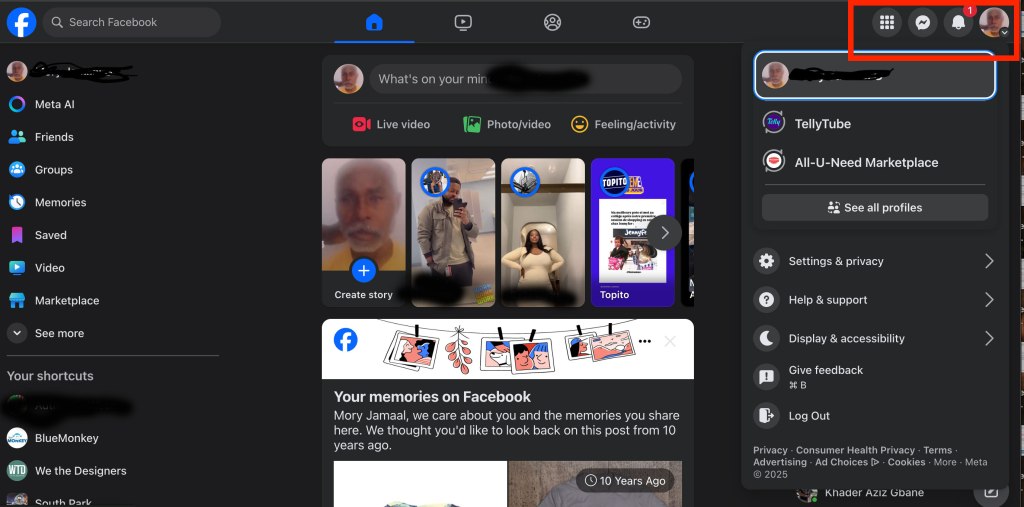
Step 1: Click on your profile picture in the upper far right corner to access the drop down menu.
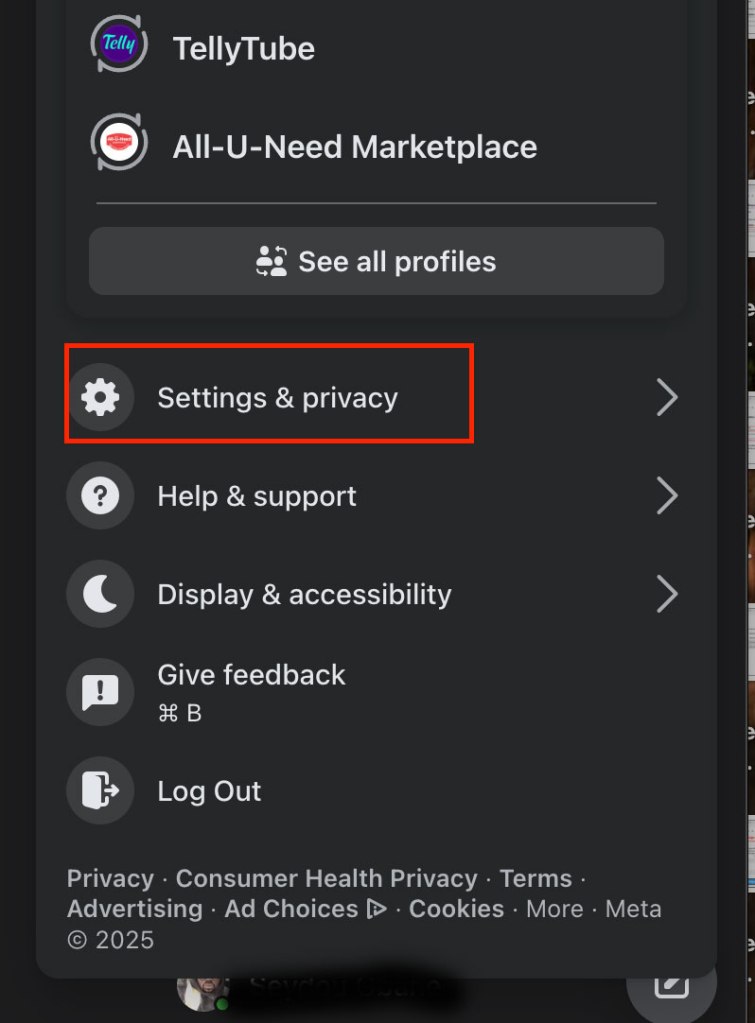
Step 2: Click on Settings & Privacy
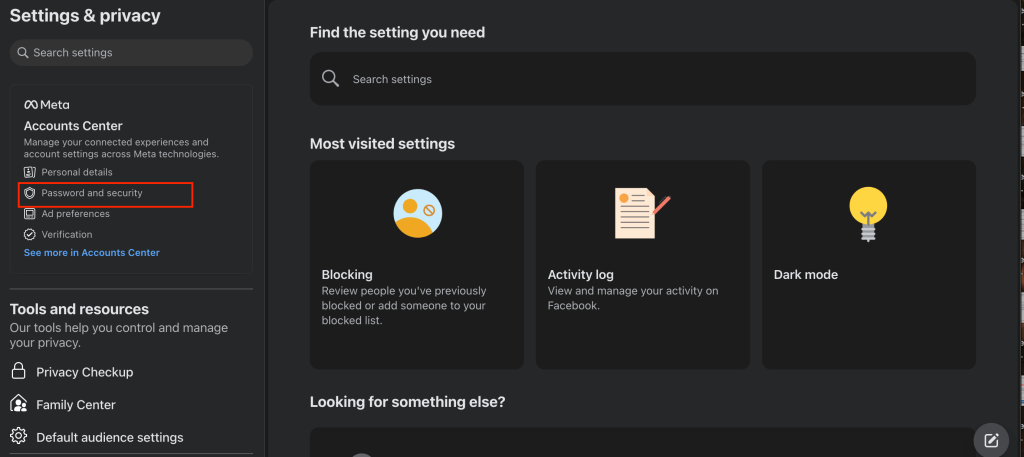
Step 3: On the Settings & Privacy page, click on Password & Security.
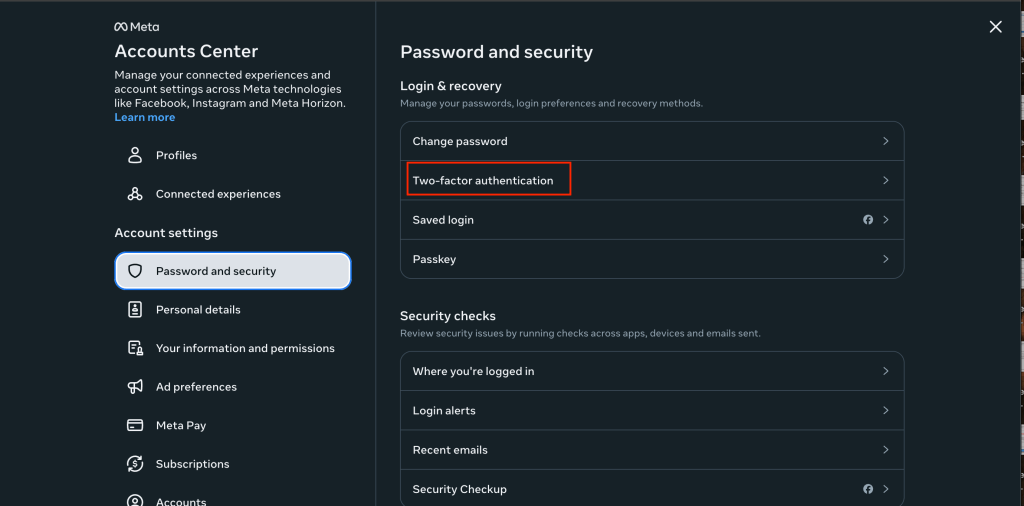
Finally on the last step click on Two-Factor Authentication on start enabling.


 Cybersecurity & IT Blog
Leave a comment